
How to use self-assessment results for professional development?
When you have completed your self-assessment, below the primary grid, you will see ´Add indicators to Professional Development Plan, you marked these indicators´.
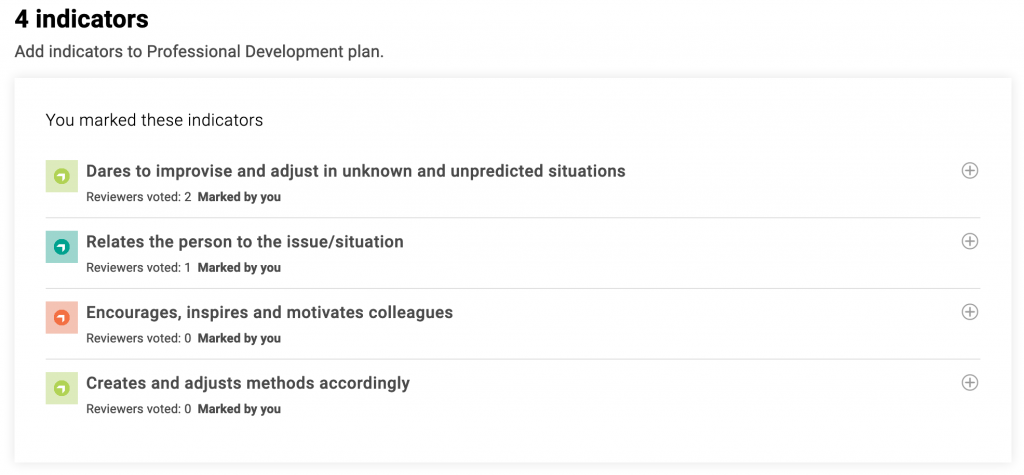
The following steps are:
- Step 1: Browse through the list of indicators you marked as ´Need development´ and choose the ones you want to focus on for your development.
- Step 2: Add indicators to your development plan by clicking the plus icon ´add this indicator to the Development Plan´.
- Step 3: Once you have added the indicators you can see them in your ‘Development Plan’.
Tasks
Task no.1
Emisă de organizator sau prin scanarea codului QR
Participate in activity
Tags
ETS-TR
#Identifying and providing appropriate resources to support individual learning
ETS-TR
#Uses online resources to extend in-person learning
ETS-TR
#Organises existing appropriate resources for individual learning purposes
ETS-TR
#Organises resources in a structured way for learning purposes
ETS-TR
#Demonstrates an understanding of learning as a continuous process
ETS-TR
#Acknowledging and dealing with unexpected learning moments and outcomes
Activități
How to use self-assessment results for professional development?
Appraiser Professional Development Guidelines
Organizație
International Youth Work Trainers Guild

Badgecraft găzduiește această platformă și o dezvoltă împreună cu organizații educaționale de top. Programul Uniunii Europene Erasmus+ a acordat cofinanțare pentru construirea primei versiuni a acestei platforme. Contactați [email protected].
Platformă
Schimbați într-o altă limbă: